Summary: A Screen Hider App helps protect your mobile screen from unwanted viewing by adding privacy filters, screen overlays and quick-hide options. Discover its useful features, how it works, how to download it and what to check before installing.
Introduction
A Screen Hider App is a useful mobile application designed to make your phone screen less visible to people around you. It can help protect personal messages, private information and other on-screen content when using your smartphone in public places. Whether you are travelling on a bus, working in an office or sitting in a crowded area, a screen privacy application can provide additional visual privacy. In this article, we explain how a screen hider works, its important features, how to use it and how to download one safely.
What Is a Screen Hider App?
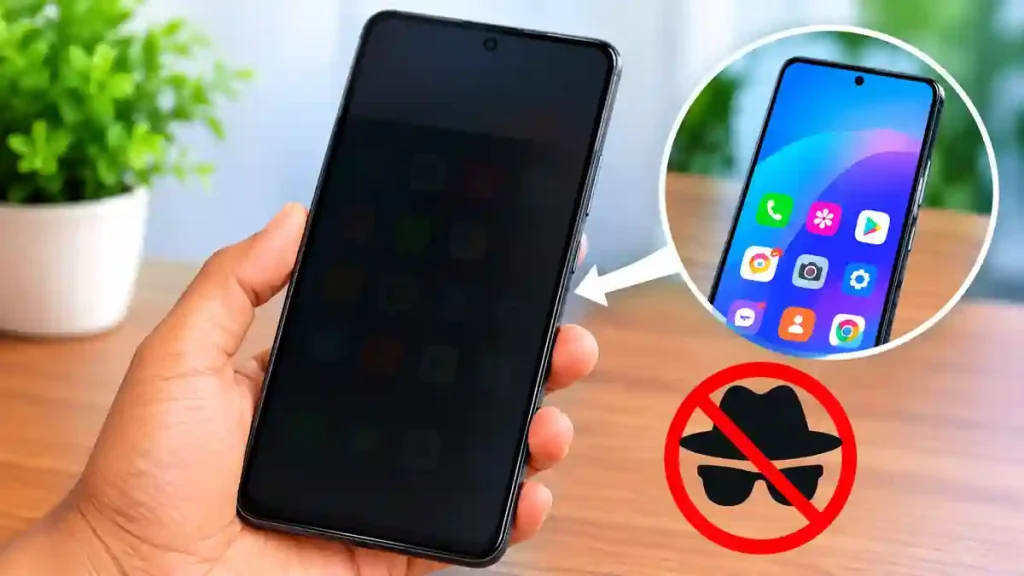
A Screen Hider App is a privacy tool that uses a software-based screen overlay to hide or reduce the visibility of selected areas of your mobile display. Depending on the application, you can apply a dark filter, adjust transparency, cover specific screen areas or activate a privacy layer when you tilt your phone.
These applications are particularly useful for people who regularly access personal information in shared environments. Some versions also provide floating controls, quick settings shortcuts and automatic screen-hiding options. However, a software overlay is not the same as a physical anti-spy screen protector.
7 Useful Features of a Screen Hider App
Here are some common features available in screen privacy applications:
- Privacy Screen Filter: Apply a dark overlay to make displayed information less visible.
- Adjustable Transparency: Control the darkness and visibility of the privacy filter.
- Partial Screen Hiding: Cover selected areas instead of the entire display.
- Tilt to Hide: Activate a privacy overlay automatically when changing your phone’s position, if supported.
- Quick Access Controls: Enable or disable privacy features using shortcuts or floating buttons.
- Screen Dimmer: Reduce screen brightness for comfortable viewing in dark environments.
- Custom Privacy Settings: Adjust the overlay’s appearance, position and intensity according to your preferences.
Feature availability depends on the application you install.
How to Use a Screen Hider App
Using a screen privacy application is generally straightforward. Follow these steps:
- Open Google Play Store on your Android smartphone.
- Search for a suitable Screen Hider App.
- Select an application and review its features and permissions.
- Download and install the application.
- Open it and enable the required screen overlay permission.
- Adjust the privacy filter, transparency and screen coverage.
- Activate the privacy mode whenever required.
Always review the permissions before enabling additional features.
Is a Screen Hider App Free?
Many screen hider applications are available for free, although some include advertisements, premium features or in-app purchases. Basic screen filtering may be available without payment, while advanced customization and additional privacy controls may require a purchase. Check the pricing information on the Google Play Store before installing an application.
Is a Screen Hider App Safe to Use?
A screen hider application can be useful, but users should check its developer information, privacy policy, permissions and data safety details before installation. Some applications require permission to display over other apps, while additional features may request accessibility access.
Remember that these applications provide visual privacy rather than complete digital security. They cannot guarantee protection against screenshots, screen recording or external monitoring.
Frequently Asked Questions
1. What is the main purpose of a Screen Hider App?
Its main purpose is to make mobile screen content less visible to nearby people using privacy filters and screen overlays.
2. Can I hide WhatsApp messages using a screen hider?
Some applications can apply privacy overlays while using messaging applications such as WhatsApp. However, this does not replace WhatsApp’s built-in privacy settings.
3. Does a screen hider work on every Android phone?
Compatibility depends on the application, Android version and device permissions. Check the app’s compatibility information before downloading.
4. Can a screen hider protect my passwords?
It may make passwords less visible to nearby observers, but it cannot guarantee password security. Use secure authentication and avoid entering sensitive information in public.
5. Is a physical privacy screen protector better?
A physical privacy screen protector uses a viewing-angle filter, whereas a screen hider app generally uses a software overlay. Both have different advantages and limitations.
Conclusion
A Screen Hider App can be a convenient option for people who want additional visual privacy while using their smartphones. Features such as adjustable filters, partial screen coverage and quick-hide controls make these applications useful in public environments. Choose a trusted application, review its permissions and remember that software-based screen hiding does not replace proper mobile security practices.n
Battery Charge Alert App: 7 Amazing & Powerful Ways to Monitor Charging
- Screen Hider: Privacy Guard – Google Play Store Apps on Google Play
- Google Play – App Safety Information
APP DOWNLOAD
Android: Download Screen Hider from Google Play
No verified official iOS version was identified for this particular app.