by
by Summary: Smartphone Security Camera technology allows you to turn an unused smartphone into a useful home monitoring device. Discover how to watch live footage, detect movement, receive security alerts and access your camera remotely using simple mobile applications.
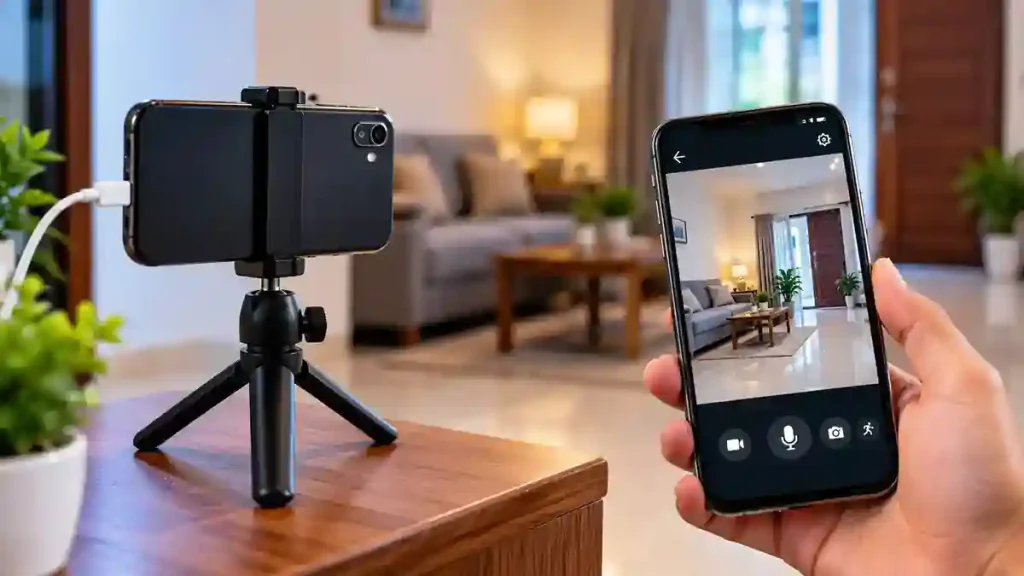
Introduction:A Smartphone Security Camera is an affordable way to monitor your home, shop or office using an unused mobile phone. Instead of purchasing an expensive CCTV system, you can install a suitable security camera application and use your old smartphone to capture live video. With the right setup, you can watch footage from another device, receive motion detection alerts and check your property remotely.
7 Useful Features You Can Get from a Smartphone Security Camera
A smartphone security camera can offer several useful monitoring features, depending on the application and subscription plan.
- Live Video Streaming: Watch the camera feed from another phone using an internet connection.
- Motion Detection: Receive alerts when movement is detected in the camera’s viewing area.
- Night Vision: Some apps provide software-based low-light viewing.
- Two-Way Audio: Listen and speak through the connected devices.
- Video Recording: Save important events for later viewing.
- Remote Monitoring: Check your home while travelling or working outside.
- Multiple Camera Support: Connect additional devices to monitor different areas.
How to Turn an Old Smartphone into a Security Camera
Follow these steps:
- Open Google Play Store or Apple App Store on both phones.
- Search for AlfredCamera and install the application.
- Sign in using the same account or follow the QR pairing process.
- Select one phone as the camera device and the other as the viewer.
- Allow the required camera, microphone and notification permissions.
- Connect both phones to a stable internet connection.
- Place the old phone in a suitable position and test the live video.
Important Things to Check Before Using an Old Phone
Before installing the phone as a permanent camera, consider these points:
- Keep the device connected to a reliable Wi-Fi network.
- Use a good-quality charger and avoid overheating.
- Position the camera where it has a clear view.
- Secure the phone with a stable stand or holder.
- Protect the viewing account with a strong password.
- Avoid recording private spaces without permission.
An old smartphone can be useful for basic monitoring, but it is not a complete replacement for a professional CCTV system.
Frequently Asked Questions
Can I use a damaged phone as a security camera?
It depends on the damage. If the camera, Wi-Fi and operating system still work properly, the phone may be usable.
Can I watch my old phone camera from another location?
Yes. Compatible applications allow remote viewing when both devices have an internet connection.
Does a smartphone security camera work without Wi-Fi?
Most remote-monitoring applications require an internet connection. Some camera apps may offer limited local recording options.
Is AlfredCamera free?
AlfredCamera offers free features and optional paid plans. Some advanced monitoring features require a subscription.
Can I use an Android phone and an iPhone together?
Yes. AlfredCamera supports Android and iOS devices, allowing cross-platform pairing.
Tips for Better Camera Performance
For better results, choose a smartphone with a good camera and sufficient storage space. Keep the camera lens clean and position the device at a suitable height. Regularly check the internet connection, battery condition and application updates to ensure smooth video streaming and reliable monitoring.
Conclusion
Using an unused smartphone as a security camera is a practical way to make better use of an old device. With a suitable application, you can monitor your home, receive movement alerts and watch live footage remotely. Make sure the phone has a working camera, stable internet and a reliable power supply before using it for regular monitoring.
Internal Link Suggestion: Atal Pension Yojana: Complete Guide to Eligibility, Benefits and Online Application
Official External Links:
APP DOWNLOAD BUTTONS
Android: Download from Google Play
iOS: Download from Apple App Store